
Form 16 is the certificate your employer gives you every year for the tax it deducted from your salary. It shows what you were paid, how your employer worked out your tax, and how much TDS it deposited with the government against your PAN. In Hindi, people simply call it the salary TDS certificate (वेतन पर कटे टैक्स का प्रमाणपत्र).
You will usually get it in June, and you need it when you file your income tax return. It is not a tax demand, and it is not your return. One more thing has changed this year: under the Income-tax Act, 2025, the same certificate is now called Form 130. Salary paid up to March 2026 is still covered by Form 16, so the certificate you received in June 2026 is a Form 16.
Five things to know first:
- Only your employer can give you Form 16. You cannot download it yourself from TRACES or the income tax portal.
- The Form 16 due date is 15 June after the financial year ends. For FY 2025-26, that was 15 June 2026.
- It has two parts: Part A shows the TDS deposited, and Part B shows your salary and tax calculation.
- The PDF password is set by your employer, not by the Income Tax Department.
- From Tax Year 2026-27, Form 16 is replaced by Form 130. The first one is due by 15 June 2027.
What Is Form 16 in Income Tax?
So, what is Form 16 in legal terms? It is a TDS certificate. Your employer deducts tax from your salary under Section 192 of the Income-tax Act, 1961, and issues the certificate under Section 203. The Income Tax Department also lists one other case: a specified bank issues Form 16 to certain senior citizens aged 75 or more whose pension and bank interest are taxed under Section 194P.
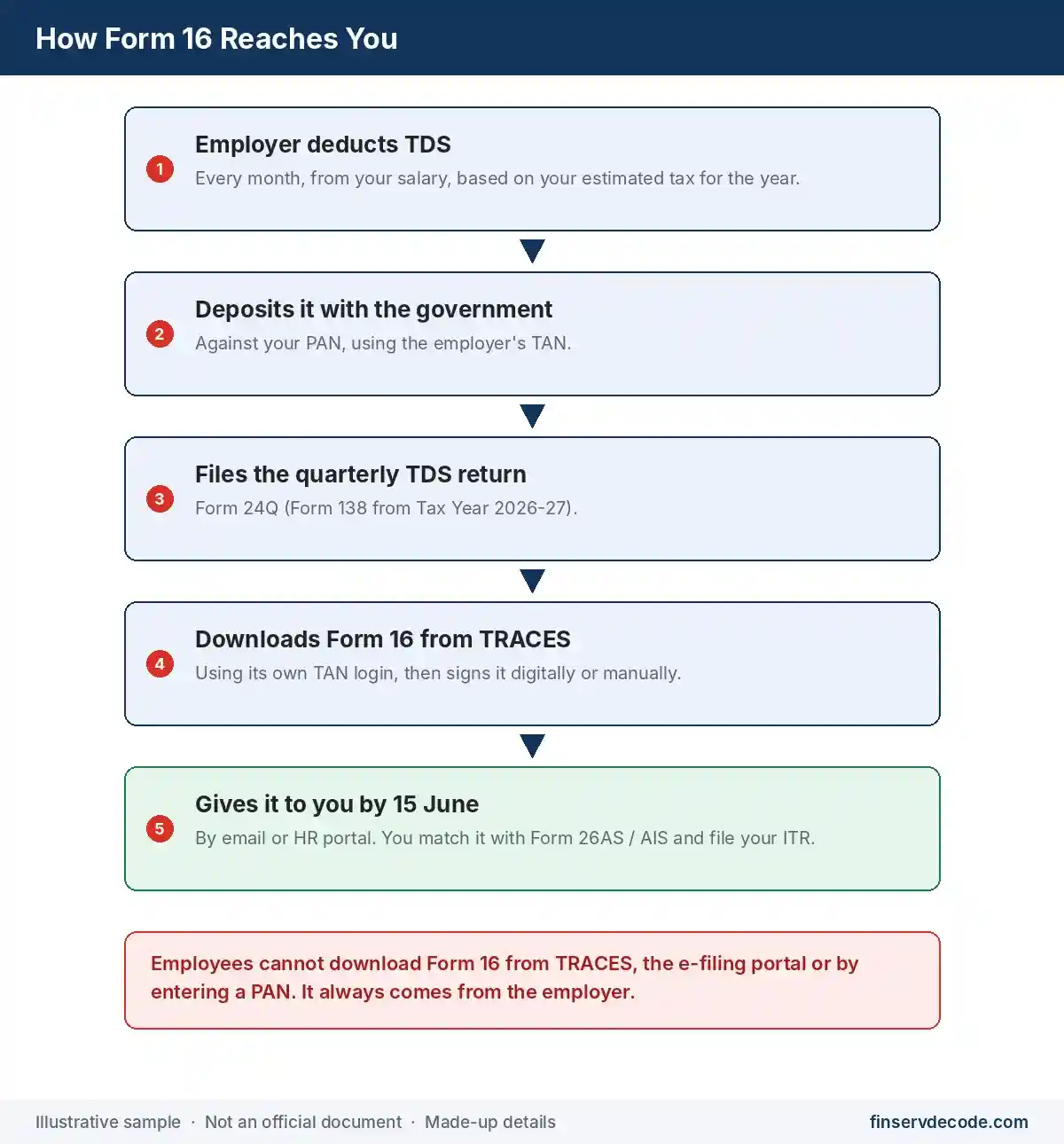
Here is how it works in practice. Every month, your employer estimates your tax for the whole year, cuts a part of it from your salary, and deposits it with the government. Each quarter, it reports these deductions in a TDS return. After the year ends, it downloads your certificate from the TRACES portal, signs it, and gives it to you. That certificate is your Form 16. The plain Form 16, then, is your employer’s signed, year-end record of the tax already taken from your salary.
It is easy to mix up three documents that salaried people deal with:
| Document | What It Covers | Who Prepares It | How Often |
|---|---|---|---|
| Salary slip | Pay and deductions for one month | Employer | Every month |
| Form 16 | Salary, tax calculation and TDS for the full year | Employer, downloaded from TRACES | Once a year |
| Income tax return (ITR) | All your income, deductions and final tax | By You | Once a year |
Form 16 is a source for your ITR, not a replacement for it. You do not attach it to the return. You keep it with your records.
Who Gets Form 16, and Who Doesn’t
Form 16 eligibility depends on one thing: whether tax was deducted from your salary. The Department’s Form 130 FAQ says issuing the certificate is mandatory once tax has been deducted and deposited. The same rule applies to Form 16.
- Tax was deducted from your salary: your employer must give you Form 16.
- No tax was deducted (for example, your income stayed below the taxable limit after deductions and rebate): the employer does not have to issue it, though many do anyway.
- You worked for two employers in the year: each one gives you a Form 16 for the months you worked there. So you get one Form 16 per employer, per year.
- You are a pensioner: the bank or office that pays your pension and deducts tax from it issues the certificate.
- You are a freelancer or consultant: you are not an employee. If tax is cut from your fees, you get a non-salary TDS certificate, Form 16A (now Form 131), not Form 16.
Form 16 Due Date: When Your Employer Must Issue It
Your employer has to issue Form 16 by 15 June of the year after the financial year in which the tax was deducted. For salary paid from April 2025 to March 2026, the deadline was 15 June 2026. There is a reason it comes in June: the employer files its last quarterly TDS return for the year by 31 May, and the certificate can be generated only after that.
If your employer is late, the penalty is on the employer, not on you. For Form 16, the Income Tax Department lists a penalty of ₹500 for every day of delay under Section 272A of the 1961 Act. For Form 130, Section 465 of the Income-tax Act, 2025 keeps the same ₹500 a day, capped at the amount of tax that was deductible.
Lost your copy? The employer can give you a duplicate, and it has to be marked “Duplicate”.
Why Form 16 Matters Beyond Your Tax Return
Form 16 is mainly a tax document, but it gets asked for in other places too, because it is a signed record of your yearly salary.
- Loans and credit cards: banks and lenders often ask for the last two or three years’ Form 16 as proof of income, along with salary slips and bank statements.
- Visa applications: some embassies and visa agents ask for Form 16 or ITR copies to show steady income.
- A new job: some employers ask for your last Form 16 to confirm your earlier salary and the TDS already deducted in the year.
- Tax notices: if the tax department questions your salary or TDS later, Form 16 is the first document you will need.
This is why it is worth keeping every year’s copy safely, even after you have filed your return.
Form 16 Format: What the Certificate Looks Like
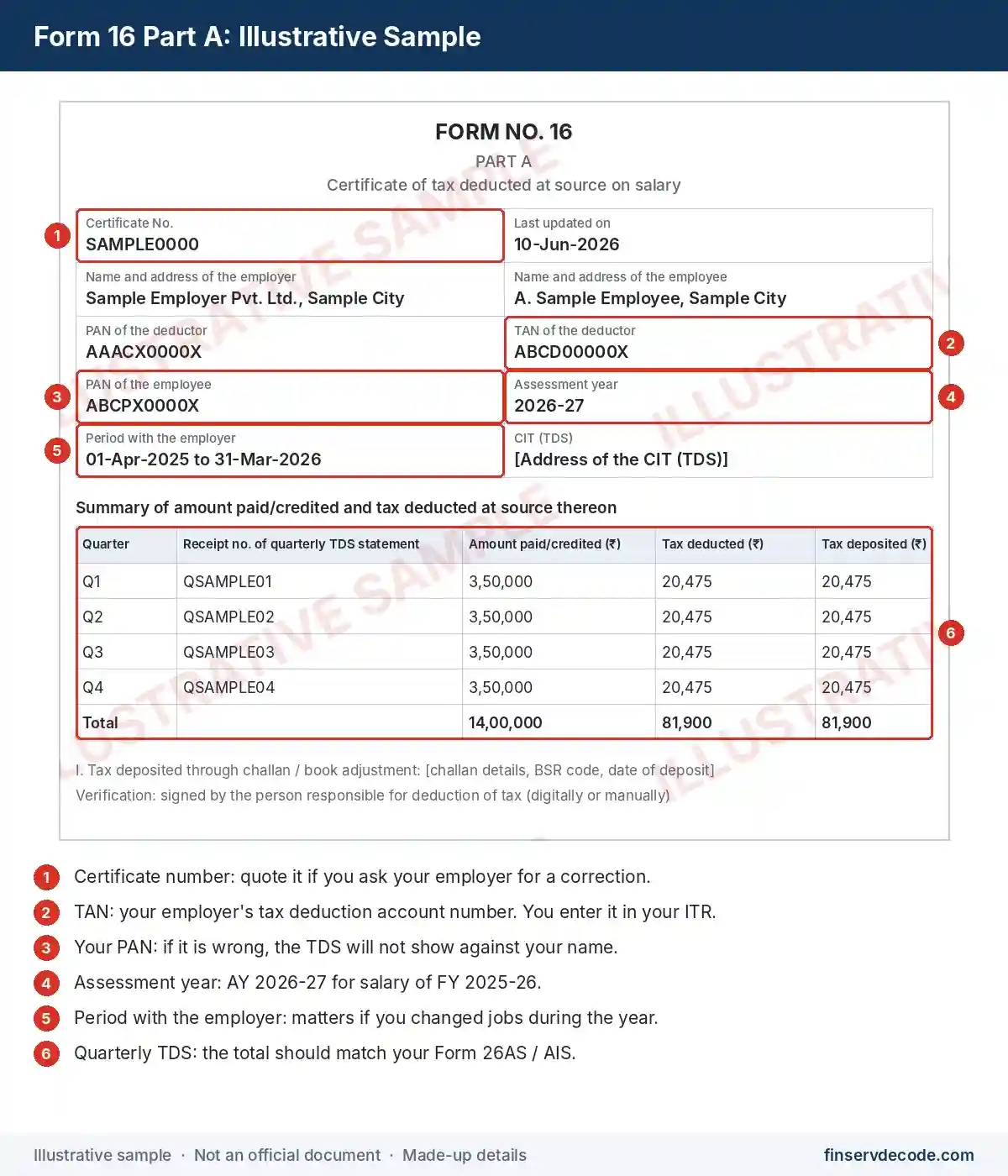
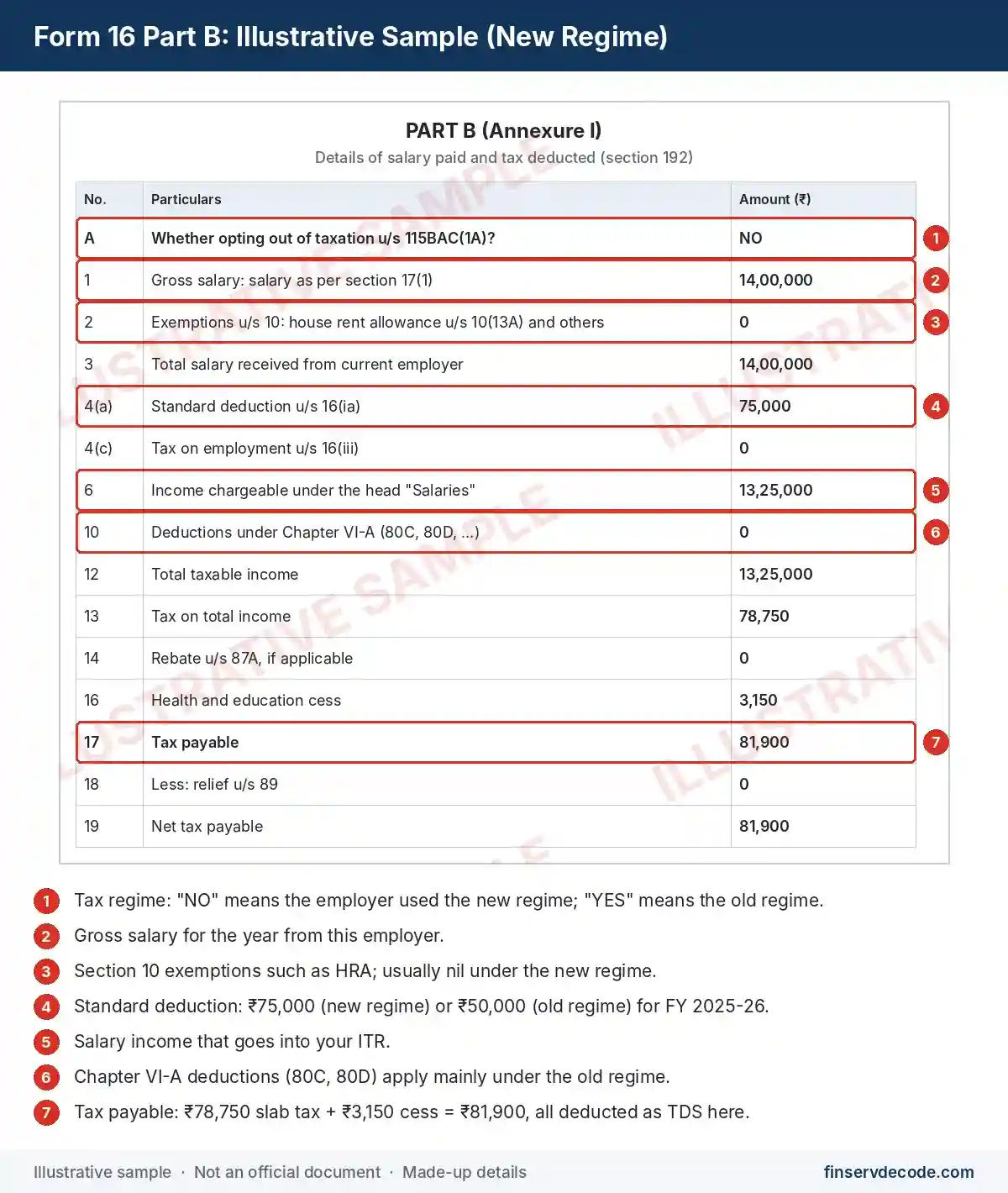
Form 16 usually arrives as a PDF of four to six pages, signed by your employer, often with a digital signature. Part A comes first, with a certificate number at the top. Part B follows, with your salary and tax worked out in numbered rows. The Form 16 format comes from the official template, so the rows are the same everywhere, even if one company’s PDF looks a little different from another’s.
The two images below are samples we made with made-up details to show where each item sits. They are not real certificates.
Form 16 Part A and Part B, Explained
Both parts of Form 16 Part A and Part B are downloaded by your employer from TRACES. Since 2019, Part B can no longer be typed up separately by payroll. But each part draws on different data, and that is worth knowing when something looks wrong.
- Part A is built from the TDS your employer reported and deposited each quarter. It tells you whether the tax reached the government against your PAN.
- Part B is built from the salary details your employer reports in its last TDS return of the year. It shows how your salary turned into taxable income and how the tax was worked out.
If Part B shows the wrong salary or a missing deduction, the mistake is in what your employer reported. Only your employer can fix it by filing a corrected TDS return.
Reading Part A, line by line
| Field | What to Check |
|---|---|
| Certificate number | Quote it if you ever need a correction |
| TAN of the employer | Your employer’s tax deduction account number. You will enter it in your ITR |
| Your PAN | Must be exactly right. A wrong PAN sends your TDS credit to someone else |
| Assessment year | AY 2026-27 for salary of FY 2025-26 |
| Period of employment | The dates you worked there. This matters if you changed jobs |
| Quarterly summary | Amount paid, tax deducted and tax deposited in each quarter |
| Challan details | How the tax was paid: a bank challan, or a book entry for government employers |
People often ask whether Form 16 has the UAN number. It doesn’t. Your UAN belongs to your provident fund records, not your tax certificate.
Reading Part B: the rows that matter
Part B is longer, but only a handful of rows need your attention.
“Whether opting out of taxation u/s 115BAC(1A)?” This is where the tax regime is mentioned. “No” means your employer used the new regime. “Yes” means it used the old regime. Many people miss this row and then wonder why their tax looks different from what they expected.
Gross salary. This includes basic pay, allowances, perquisites, and profits instead of salary. If you told your employer about salary from an earlier job, that may be added here too.
Exemptions under Section 10. This covers HRA (Section 10(13A)), leave travel concession (Section 10(5)) and similar items. Under the new regime, these are usually zero.
Standard deduction under Section 16(ia). For FY 2025-26, it is ₹75,000 under the new regime and ₹50,000 under the old regime.
Income chargeable under the head “Salaries”. This is your salary after exemptions and Section 16 deductions. It is the figure your ITR’s salary section is built around.
Chapter VI-A deductions. Under the old regime, this includes 80C (where your own EPF contribution appears), 80D, and others. Under the new regime, most of these are not allowed, but a few, such as your employer’s NPS contribution under Section 80CCD(2), still are.
Rebate under Section 87A. This shows if your tax was cut to nil or reduced. It applies only to resident individuals within the income limits.
Tax payable and relief under Section 89. This is the final tax figure, along with any relief for salary arrears.
If your salary is above ₹1,50,000, perquisites such as a company car or a rent-free house are listed separately in Form 12BA, which comes along with Form 16.
You can choose a different regime when you file your return, within the regime-selection rules. If you do, your final tax will not match Part B, as expected. The old and new tax regime comparison shows which deductions each regime allows.
How to Download Form 16
Here is the short answer to how to download Form 16: you get it from your employer. Every genuine Form 16 download starts with your employer; no government website provides it to employees.
Most people find it in one of these places:
- Your work email, usually in May or June, in a mail from HR or payroll with the PDF attached.
- Your company’s HR or payroll portal, under a section such as “Tax documents”, “Payslips” or “Year-end documents”.
- A request to payroll. If you can’t find it, email HR or payroll with your employee ID, PAN, and the financial year you need.
When you open it, check your name, PAN, the employer’s TAN, and the assessment year before you rely on any figure.
Can I download Form 16 from TRACES with my PAN number?
No. Here are some reasons:
- TRACES Form 16 download is for employers only. The employer logs in to TRACES with its TAN, requests the certificates for its employees’ PANs, and downloads them. An employee login cannot fetch Form 16.
- The income tax e-filing portal lets you see Form 26AS (Form 168 from Tax Year 2026-27) and your Annual Information Statement (AIS). These show your TDS, but not Form 16 itself.
- “Form 16 download by PAN number” is not an official service. Be careful with any website that asks for your PAN and date of birth to “fetch” your Form 16.
- The blank Form 16 on government sites is only the empty format, not your certificate.
While you wait for the certificate, you can still check your TDS on Form 26AS or Form 168 and AIS.
Form 16 for a previous year or an old employer
Need an old year’s certificate, or one from a company you have left? Write to that employer’s HR or payroll team. The employer that deducted the tax is responsible for the certificate, even after you resign. If the original is lost, ask for a duplicate. It also helps to save a copy of each year’s Form 16 in your own storage, because you will lose access to your work email when you leave.
Form 16 Password: Why Your PDF Won’t Open
Many employers lock the Form 16 PDF because it carries your PAN and salary. The Form 16 password is set by your employer or its payroll software. The Income Tax Department’s Form 16 and Form 130 pages do not prescribe any password format, so there is no single official password that works for everyone.
Common formats include your PAN, your date of birth, or a mix of the two. Before you start guessing:
- Look for the password instructions in the same email or portal page where you found the file.
- If it uses your PAN, check whether the letters should be in capitals or lowercase.
- If it uses your date of birth, check the format, such as DDMMYYYY.
- If it still won’t open, ask payroll for the format or a fresh copy. Avoid online “PDF password remover” sites, because using one means uploading your PAN and salary details to an unknown server.
How to File ITR With Form 16, Step by Step
Here is how to file ITR with Form 16 without missing anything:
- Check the basics. Confirm your name, PAN, employer’s TAN, and the assessment year on both parts.
- Match the TDS. Compare the total TDS in Part A with Form 26AS (or Form 168) and AIS. If they don’t match, ask payroll to correct its TDS return before you file.
- Check the pre-filled salary. The e-filing portal usually pre-fills your salary from your employer’s TDS return. Compare those figures with Part B and your payslips before you accept them.
- Confirm the TDS entry. Make sure the employer’s TAN and the TDS amount appear in the taxes-paid section. Add them if they are missing.
- Pick your regime. You choose it in the return, and it can differ from the one your employer used in Part B.
- Add what Form 16 doesn’t cover. Savings and FD interest, capital gains, rent and any other income go in your return too.
For a wider view of how salary sits alongside your other income, see how income tax works in India.
HRA missing in Form 16? You can still claim it
If you didn’t submit rent receipts to your employer in time, Part B will show no HRA exemption. Under the old regime, you can still claim the HRA exemption under Section 10(13A) in your ITR, as long as you meet the conditions and keep rent receipts, plus the landlord’s PAN where required. The claim lowers the salary income in your return compared with your employer’s figure. Whether you get a refund depends on your final tax and the TDS already deducted. HRA exemption is not available under the new regime.
Can you file ITR without Form 16?
Yes. Since Form 16 is not attached to the return, you can file using your salary slips for the salary breakup, Form 26AS (or Form 168) and AIS for TDS, and your own investment proofs. This is common when no tax was deducted, or when an employer shut down or didn’t issue the certificate. It takes more care, so match every figure. And even if no tax was deducted, you may still need to file a return, depending on your total income.
Form 16 Mistakes: Wrong PAN, TDS Mismatch and Missing Deductions
| Problem | What to Do |
|---|---|
| Wrong name or PAN | Ask payroll to correct the PAN in its TDS return and reissue Form 16. Until then, the TDS won’t show against your PAN |
| Part A TDS doesn’t match Form 26AS | The employer must file a corrected TDS return. A revised certificate can be downloaded only after it is processed |
| Salary in Part B doesn’t match your payslips | Compare month by month and raise the gap with payroll in writing |
| A deduction you declared is missing | Check whether your proofs reached payroll before its cut-off. If not, you can claim the eligible deduction in your ITR under the old regime |
| Part B uses a regime you don’t want | This is not an error. Choose your regime in the ITR, within the regime-selection rules |
| No Form 16 after 15 June | Check the HR portal, confirm TDS was deducted in Form 26AS or AIS, then follow up with payroll in writing |
Changed Jobs? Two Form 16s and Form 12B (Now Form 122)
Each employer that deducted tax gives you its own Form 16 for its months. Your new employer’s certificate does not cover the salary you earned at your old job.
To help your new employer deduct the right tax, you can tell them about your earlier salary and TDS. Until March 2026, this declaration was Form 12B. Under the Income-tax Rules, 2026, it is part of Form 122. The Form 122 FAQ describes it as a single declaration of salary from another employer, other income, and tax already deducted. The FAQ says it is not mandatory by law and is not uploaded with your return, but it helps your employer deduct the correct tax.
Skipping it can cost you later. Each employer may give you the benefit of the lower tax slabs separately, so the total TDS for the year can fall short, and you may have to pay the balance when you file.
When you file, add the salary and TDS from every Form 16 you received, and check that the total TDS matches Form 26AS or Form 168.
Form 16 Replaced by Form 130 From Tax Year 2026-27
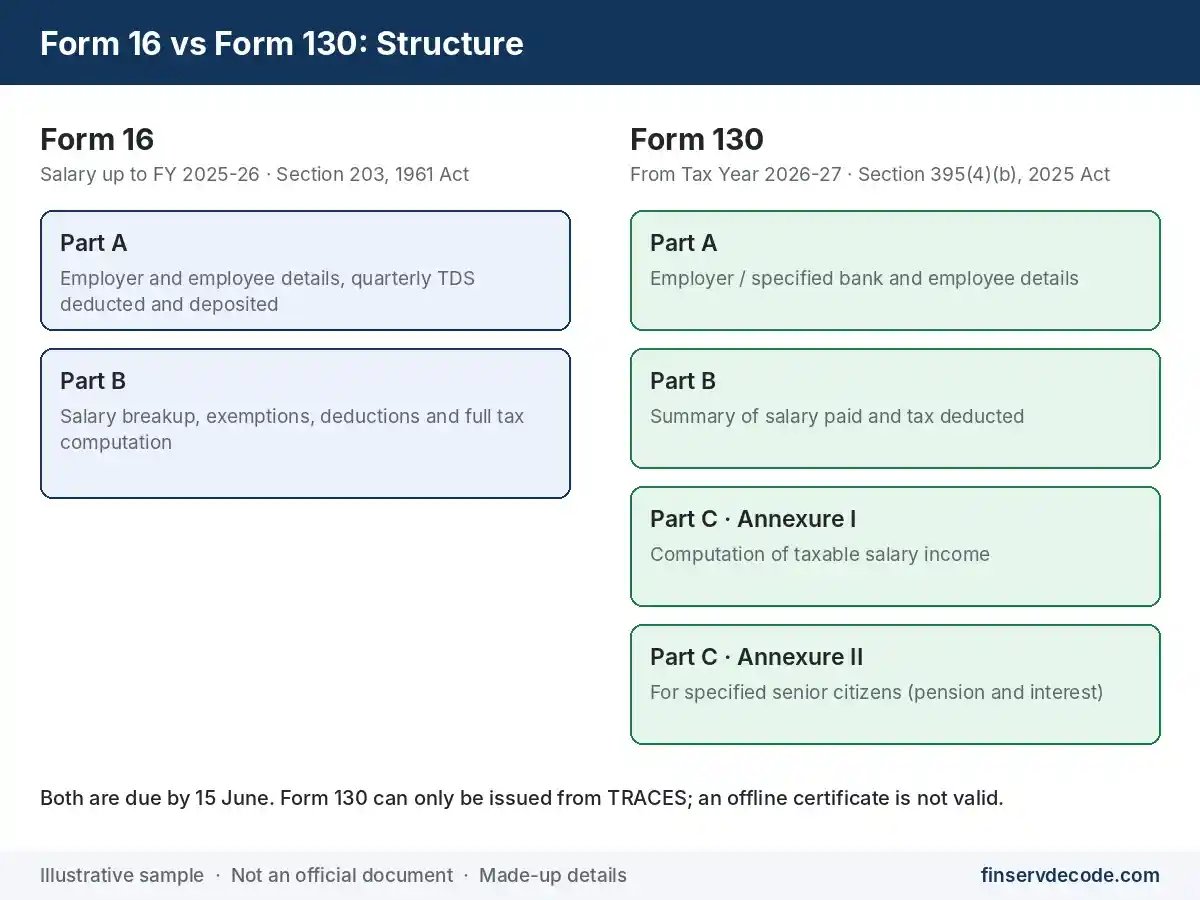
The Income-tax Act, 2025 came into force on 1 April 2026. Under it and the Income-tax Rules, 2026, the salary TDS certificate is Form 130, issued under Section 395(4)(b). For salary paid in FY 2025-26, the old Act still applied, so you received Form 16 in June 2026. Your first Form 130 will cover Tax Year 2026-27 and is due by 15 June 2027. The Tax Year under the new Act replaces the old pair of previous year and assessment year, which is why the new forms refer to a single year.
| Point | Form 16 (up to FY 2025-26) | Form 130 (from Tax Year 2026-27) |
|---|---|---|
| Law | Section 203, Income-tax Act, 1961 | Section 395(4)(b), Income-tax Act, 2025 |
| Parts | Part A and Part B | Part A (employer and employee details), Part B (summary of amount paid and TDS), Part C (computation: Annexure I for salary, Annexure II for specified senior citizens) |
| Generated from | Quarterly TDS return in Form 24Q | Quarterly TDS statement in Form 138 |
| How it is issued | Downloaded from TRACES and signed | Downloaded from TRACES and signed digitally or manually. A certificate prepared any other way is not valid |
| Due date | 15 June | 15 June (first one by 15 June 2027) |
| After a job change | Part A from each employer; Part B from each employer or only the last one | Parts A and B from each employer; Part C (Annexure I) from each employer or only the last one |
The checks you do stay the same: PAN, TDS against your annual tax statement, and the salary figures. The Form 130 FAQ also confirms that the certificate is not attached to your return.
Other form numbers changed too. The Department’s note on Forms 130 to 133, along with its Form 168 and Form 122 pages, lists them:
| Old Form | New Form (Income-tax Rules, 2026) |
|---|---|
| Form 16 (salary TDS certificate) | Form 130 |
| Form 16A (non-salary TDS certificate) | Form 131 |
| Forms 16B, 16C, 16D and 16E | Form 132 (merged into one) |
| Form 24Q (quarterly salary TDS return) | Form 138 |
| Form 26AS (annual tax statement) | Form 168 |
| Forms 12B and 12BAA (other employer and other income details) | Form 122 |
Form 16 vs Form 26AS vs AIS Comparison
| Document | What It Shows | Who Generates It | Where You Get It |
|---|---|---|---|
| Form 16 (Form 130 from Tax Year 2026-27) | Salary and TDS from one employer, with the tax calculation | Employer, through TRACES | From your employer |
| Form 26AS (Form 168 from Tax Year 2026-27) | All tax credits against your PAN, from every deductor | Income Tax Department | e-filing portal: e-File > Income Tax Returns > View Form 26AS / Form 168 |
| AIS | Wider financial information: interest, dividends, share trades, high-value transactions | Income Tax Department | e-filing portal |
Think of it this way: Form 16 tells you what one employer did, while Form 26AS and AIS tell you what the government’s records show from all sources. Before you file, these should agree with each other.
Form 16 vs Form 16A, 16B and 16C Comparison
The names look alike, but each certificate covers a different kind of payment.
| Form | What It Certifies | Issued By | New Number |
|---|---|---|---|
| Form 16 | TDS on salary | Employer, once a year by 15 June | Form 130 |
| Form 16A | TDS on non-salary payments, such as bank interest or professional fees | The payer, every quarter | Form 131 |
| Form 16B | TDS on the purchase of property | Buyer, to the seller | Form 132 |
| Form 16C | TDS on rent paid by certain individuals and HUFs | Tenant, to the landlord | Form 132 |
If salary is your only income and your employer deducted TDS, Form 16 is the only certificate you need from this list.
Before You File: A Quick Form 16 Check
When your Form 16 arrives, a few minutes of checking can save you a tax notice later:
- Your PAN and name are correct in Part A.
- The total TDS matches Form 26AS (or Form 168) and AIS.
- The salary in Part B matches your payslips.
- You know which regime your employer used, and you have decided which one you will choose.
- If you changed jobs, you have a Form 16 from every employer.
From Tax Year 2026-27, the certificate will arrive as Form 130, but these same checks will still apply.
Frequently Asked Questions About Form 16
Is Form 16 mandatory for filing ITR?
No. It is not attached to the return. You can file using payslips, Form 26AS (or Form 168) and AIS, though Form 16 makes the job much easier.
Where is the tax regime mentioned in Form 16?
In Part B, in the row “Whether opting out of taxation u/s 115BAC(1A)?”. “No” means your employer used the new regime, and “Yes” means it used the old regime.
What is TAN in Form 16?
TAN is your employer’s tax deduction and collection account number. It is printed in Part A, and you need it in your ITR to claim the TDS.
Does Form 16 show EPF or UAN?
Your own EPF contribution can appear under Section 80C in Part B if your employer used the old regime. Your UAN does not appear anywhere in Form 16.
Can I get Form 16 from my previous employer after resigning?
Yes. Ask that employer’s HR or payroll team. They can issue a duplicate if you have lost the original.
What happens if my employer does not give Form 16?
Follow up in writing, check your TDS in Form 26AS or AIS, and file your return using your other records. The penalty for not issuing the certificate falls on the employer.
Do pensioners get Form 16?
Yes, if tax is deducted from the pension. The bank or office that pays the pension issues it. A specified bank also issues it to certain senior citizens aged 75 or more under Section 194P.
Why are the figures in my ITR different from Form 16?
Usually because you chose a different regime, claimed a deduction your employer did not include, or have other income. Your ITR is the final word on your tax, not Form 16.
Conclusion
Form 16 is your employer’s yearly proof of the tax taken from your salary: Part A shows the TDS reported and deposited against your PAN, and Part B shows how the tax was worked out. You get it from your employer by 15 June, not from TRACES or the tax portal.
When it arrives, check your PAN, match the TDS with Form 26AS or AIS, and look at the regime row in Part B before you file. From Tax Year 2026-27, the same certificate comes as Form 130, but the checks stay the same.
Disclaimer: This article is for general information only and is not tax advice. Rules, form numbers, penalties, and due dates are based on the Income-tax Act, 1961, the Income-tax Act, 2025, the Income-tax Rules, 2026, and Income Tax Department pages as checked as of now, and they can change through notifications or Finance Acts. The Form 16 images in this article are illustrative samples created by finservdecode.com with made-up details. They are not official documents and must not be used as such. Please check the latest rules on the Income Tax Department’s website, or consult a Chartered Accountant about your own situation.